
Build AI Agent Python Tutorial: Create a Bot in 50 Lines
Many developers want to learn how to build AI Agent Python tools without using complex frameworks. Everyone is talking about “AI Agents”—software that doesn’t just talk, but actually does things. But if you look for tutorials, you mostly find complex guides using heavy frameworks like LangChain or CrewAI.
Sometimes, you don’t need a framework. You just need to understand the logic.
In this guide, I’m going to show you how to build a minimalist AI Agent from scratch using Python. No complex dependencies, just pure logic. By the end of this tutorial, you will have a bot that can “think” about a problem and choose the right tool to solve it.
What We Are Building
We are going to build a simple “Math & Time” agent. It will be able to:
- Identify if a user is asking for a calculation or the current time.
- Pick the correct Python function to run.
- Return the final answer in natural language.
Prerequisites
- Python installed on your machine.
- An API Key (You can use OpenAI, or a local LLM like Mistral/Ollama if you want to keep it free).
Step 1: The Setup
First, we need the standard OpenAI library. If you are using a local model (like Mistral via Ollama), the code is almost identical.
pip install openaiStep 2: Define Your “Tools”
An agent is only as good as its tools. Let’s give our agent two capabilities: calculating numbers and checking the time.
import datetime
import json

# Tool 1: Get Current Time
def get_current_time():
    now = datetime.datetime.now()
    return json.dumps({"current_time": now.strftime("%Y-%m-%d %H:%M:%S")})

# Tool 2: A Simple Calculator
def calculate(expression):
    try:
        # Warning: eval() is dangerous in production, but fine for this local test
        result = eval(expression)
        return json.dumps({"result": result})
    except Exception as e:
        return json.dumps({"error": str(e)})
Step 3: The “Brain” (The Agent Logic)
Here is where we really start to build AI Agent Python logic. We aren’t just sending a prompt; we are sending a prompt with instructions on how to use tools.
Visualizing the decision flow: User Query → Agent Decision → Tool Execution.
from openai import OpenAI

# CONFIGURATION
# Replace with your actual API Key
client = OpenAI(api_key="YOUR_API_KEY_HERE")
# Note: If using Local LLM, set base_url="http://localhost:11434/v1"

def run_agent(user_query):
    # System prompt tells the AI how to behave
    system_prompt = """
    You are a helpful assistant. You have access to two tools: 'get_current_time' and 'calculate'.
    If the user asks for the time, reply with specific keyword: ACTION: TIME.
    If the user asks for math, reply with: ACTION: CALC [expression].
    Otherwise, just chat normally.
    """

    response = client.chat.completions.create(
        model="gpt-4o-mini", # Or "mistral" if running locally
        messages=[
            {"role": "system", "content": system_prompt},
            {"role": "user", "content": user_query}
        ]
    )

    content = response.choices[0].message.content

    # The Agent "Reasoning" Loop
    if "ACTION: TIME" in content:
        print(f"🤖 Agent decided to check the clock...")
        return get_current_time()

    elif "ACTION: CALC" in content:
        expression = content.split("CALC")[1].strip()
        print(f"🤖 Agent decided to calculate: {expression}")
        return calculate(expression)

    else:
        return content

# Let's test it!
if __name__ == "__main__":
    query = "What is 25 * 4 + 10?"
    print(f"User: {query}")
    print(f"Agent Response: {run_agent(query)}")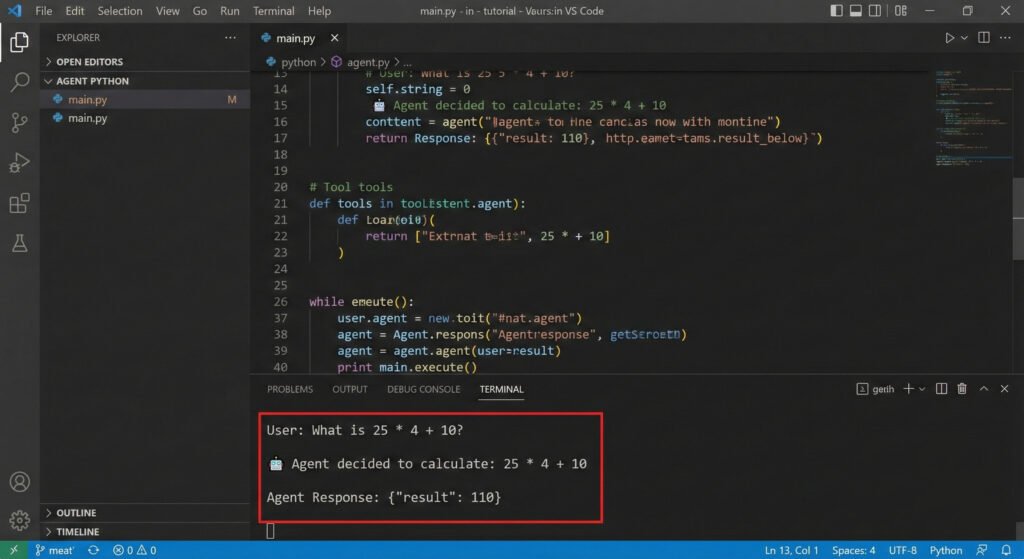
Step 4: Why This Matters
Most developers stop at print(response). But by adding that if/else logic (The “Reasoning Loop”), you have technically created an Agent.
This script detects intent (ACTION: TIME) and executes code (get_current_time()). This is the fundamental building block of complex systems like AutoGPT or BabyAGI.
Caption: Proof that the code works – Python code running a simple AI agent in VS Code.
Conclusion
Now you know how to build AI Agent Python systems efficiently. You don’t need to wait for AGI to start building smart software. Start with this script, add a tool for “Web Search” or “Email,” and you suddenly have a powerful personal assistant running on your laptop.